
Crew planner for construction subcontractors
A crew planner shows which crew leader is on which job, on which days, across every job you have. Here is what to look for, and how Broadside does it.
By the Broadside team. Last updated .
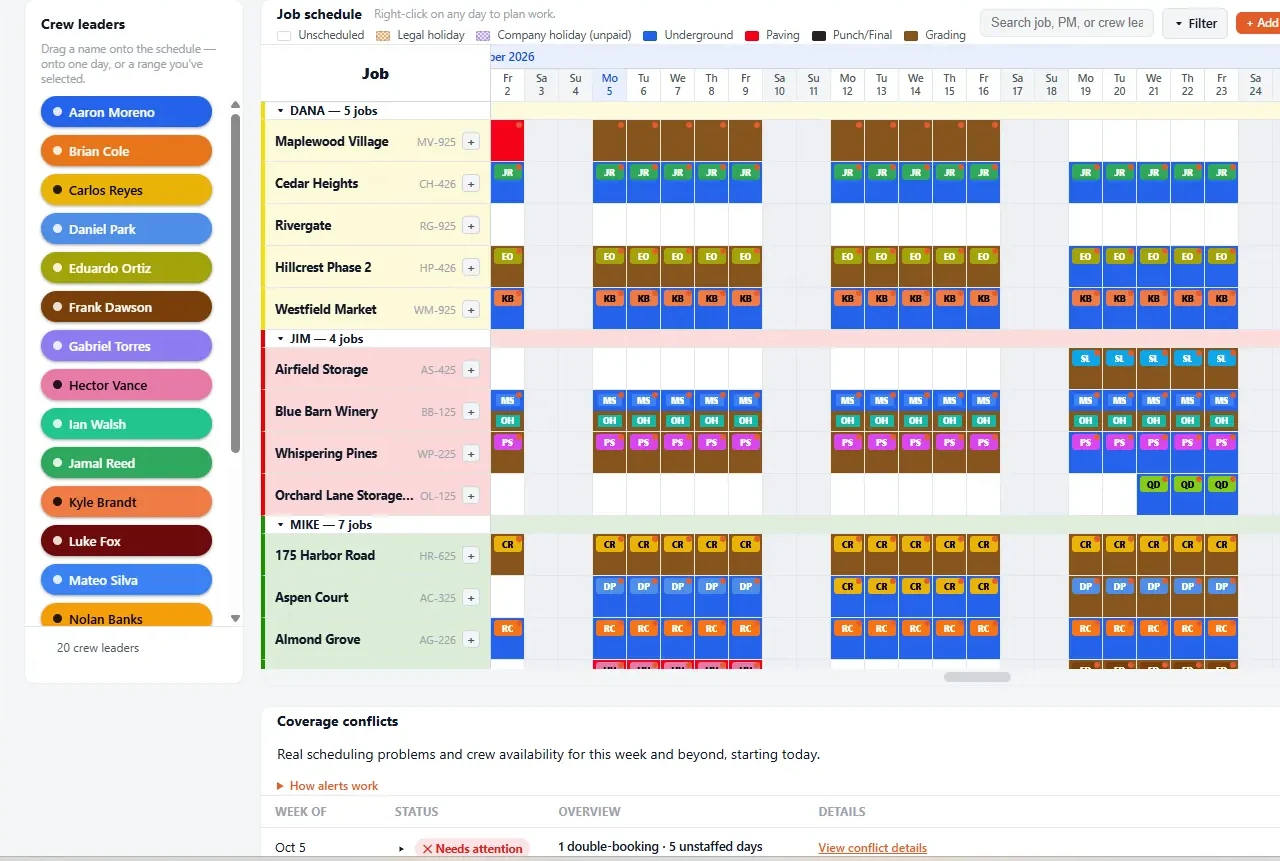
A crew planner is the one place where you plan your crews. For a subcontractor it is a board with jobs down the side and days across the top, and a crew leader on each job for each day. It answers the questions that come up every week: who is on that job Monday, who is free next Thursday, and can we take the new job.
What a crew planner should do
- Show every job at once. Not one project at a time. Your problems come from jobs overlapping.
- Put a named crew leader on each day. Drag a crew leader onto a job, or onto a range of days, and move it when the GC moves the job.
- Catch conflicts for you. The same crew leader on two jobs on one day, and days with work and nobody on it, should be flagged without you hunting for them.
- Look past this week. Plan a few weeks closely and the months beyond in outline, up to about a year ahead.
- Let the whole office see the same plan. Several people edit at the same time, and foremen and estimators can view it for free.
Plan the headcount too
Crew leaders are only part of it. Broadside also has a workforce planner that compares the headcount each job needs, by position, with the headcount you have on hand. You see a shortage weeks before it costs you a day, and you can see it by position, so a spare operator does not hide a missing laborer.
Crew planner, spreadsheet, or dispatch app
- A spreadsheet works while one person runs the plan and jobs do not move much. See Broadside vs Excel, or start with our free crew schedule template.
- A dispatch app runs tomorrow: who goes where at 7 AM. A crew planner plans the weeks before that. They work side by side. See crew planning vs dispatch.
- A crew planner like Broadside is for when several people edit the plan, jobs move every week, and you need to see conflicts before the week starts.
Where to start
If you are new to planning crews ahead, read the construction look-ahead schedule guide and the three week look-ahead page. Both work in Excel or in Broadside. When you are ready to try a live board, the trial is 14 days with no card. See pricing: two paid seats are included, and viewers are always free.
Questions about crew planners
- What is a crew planner?
- A crew planner is a board that shows which crew leader is on which job on which day, across every job a company has. It helps a subcontractor see double-bookings, days with no one on them, and whether there are enough crews for the work ahead.
- What is the best way to plan crews for several jobs at once?
- Put every job and every crew leader on one plan, so you can see them together. Plan the next few weeks with named crew leaders and the months beyond in outline, and update it the same day a GC moves a job. A spreadsheet works for a small plan. A live board helps when several people edit it.
- How far ahead can Broadside plan crews?
- Broadside plans from this week out to about a year ahead. Most teams plan the next few weeks closely and the months beyond in outline.
- Does Broadside plan headcount as well as crew leaders?
- Yes. The workforce planner compares the headcount each job needs, by position, with the headcount you have on hand, so you can see a shortage before it costs you a day.
- Who needs a paid seat?
- Anyone who edits the plan. People who only view it are free, so foremen, estimators, and project managers can see it at no cost. The plan is $49 a month with two paid seats included, then $19 a month for each extra seat.
- Is there a free trial?
- Yes. The trial is 14 days and needs no credit card.
Try the crew planner built for subcontractors, free for 14 days.
Start free trial14 days free. No credit card. Viewers are always free.