
Three week look-ahead for subcontractors
What goes in a three week look-ahead for your crews, how to build one in four steps, and a free template to start with.
By the Broadside team. Last updated .
A three week look-ahead is a short window of the schedule: this week and the next two. The general contractor often asks for one. As a subcontractor, you also need your own, because the GC schedule shows your dates and not whether you have the crews to hit them.
Two kinds of look-ahead
- The GC look-ahead. One project, every trade, the next few weeks. It tells you where you are needed and when.
- Your crew look-ahead. Your company, every job you have, the next few weeks. It tells you which crew leader is on which job each day.
The first one feeds the second. Take your lines from each GC look-ahead and put them on one plan, so you can see all of your jobs at once. For the full method, read the crew look-ahead guide.
What goes in each of the three weeks
- Week one. Set. Every job has a named crew leader for each day. It changes for weather and emergencies, and nothing else.
- Week two. Firm but movable. Crew leaders are named and jobs are in order. Expect a few changes as the GC firms up its own dates.
- Week three. An outline. Which jobs start, and roughly how many crews you need. Names can wait, and you tighten it as it moves into week two.
Build one in four steps
- List the jobs in the window. Only your lines from each GC schedule: start, finish, and the kind of work.
- List your crew leaders. One crew leader can be on one job per day.
- Put a name on each job for each day. Start with week one and work outward.
- Check for problems. Look for the same name on two jobs on one day, days with work and nobody on it, and crew leaders with an empty week.
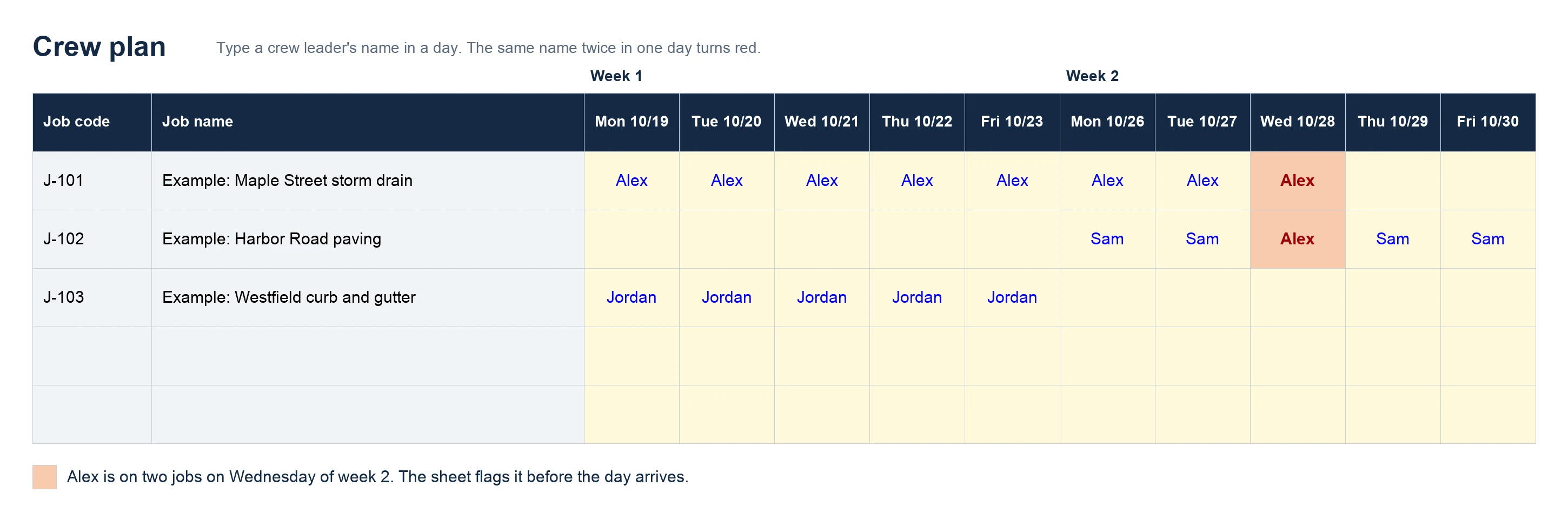
Download the free template. It has no macros, and there is no sign-up and no email needed.
Keep it current
- Update it at least weekly, on a set day.
- When a GC moves a job, update the plan the same day.
- Give each job one owner, usually the project manager.
A look-ahead that is a week stale is worse than none, because people trust it. If the plan keeps going stale because several people edit it, see Broadside vs Excel for when a live board saves time.
Questions about the three week look-ahead
- What is a three week look-ahead?
- A three week look-ahead is a short window of the schedule: this week and the next two. For a subcontractor it shows which crew leader is on which job each day, so you can fix problems before they reach the field.
- How is it different from the GC schedule?
- The GC schedule covers every trade on the project and can run for years. A subcontractor look-ahead covers only your crews, across every job you have, for the next few weeks. The GC schedule sets your dates. Your look-ahead shows whether you have the crews to hit them.
- How often should I update a three week look-ahead?
- At least weekly, and the same day a GC moves a job. A look-ahead that is a week stale is worse than none, because people trust it.
- Who should own the look-ahead?
- Each project manager should update their own jobs, and one person should look over the whole plan each week. If everyone owns it, nobody updates it.
- Is there a free three week look-ahead template?
- Yes. Our free Excel template has a crew plan sheet with jobs down the side and days across. The first three weeks of it are your three week look-ahead. There is no sign-up and no email needed.
When the sheet starts fighting you, try Broadside free for 14 days.
Start free trial14 days free. No credit card. Viewers are always free.