
CREW LOOK-AHEAD FOR SUBCONTRACTORS
See where your crews are committed, 3 weeks out or a year out.
Put every job and every crew leader on one live board. Catch double-bookings before Monday. When a GC pushes you, drag the job and see what it hits.
14 days free. No credit card. Viewers are always free.
Not dispatch. Not timecards. Not a GC project suite. Just your crews, your jobs, and the weeks ahead.
The GC schedule runs two years. You need your slice of it.
GCs send the whole project. Most of it isn't your work. What you need is your slice, for every job you have, on one board.
Where you show up.
Every job your company is on, in one place.
When you're in.
Your window and your scope. Not every other trade's.
When it moves.
Pushed out or pulled up, you see it and fix it.
Where crews go next.
Every crew leader, from next week out to next year.
Right now the plan lives in one spreadsheet and one person's head.
That works until it doesn't.
- Two people edit the sheet. One saves over the other.
- A GC pushes a job two weeks. Someone retypes twenty cells.
- A crew leader is on two jobs Thursday. Nobody knows until Thursday.
- The owner asks "can we take this job?" and the answer takes a phone call and an hour.
- The person who built the sheet goes on vacation.
You pay for it in crews sitting, crews bounced between jobs, overtime, and dates you can't hit.
How it works
Add your jobs.
Just your window from each GC schedule. When you're in and what you're doing.
Add your crew leaders.
The people who run your crews.
Put crews on jobs.
Lay out the work by type and day. Put crew leaders on by name, as far ahead as you plan.
Fix it before Monday.
The conflicts panel shows who is doubled, which days are short, and who is sitting. When a GC moves you, drag the job.

Every new account starts with a sample company, so you can see how it works before you add your own jobs.
Plan the weeks. Your dispatcher runs the day.
Broadside is not a dispatch app. It doesn't build tomorrow's sheet, route trucks, or track tickets. It's the plan your dispatcher works from.
| Broadside | Dispatch app | |
|---|---|---|
| Looks at | Next week out to next year | Today and tomorrow |
| Plans | Jobs and crew leaders | People, equipment, trucks, deliveries |
| Answers | Are we short? Who's doubled? Can we take this job? | Who goes where at 7 AM? |
| Trucks, tickets, GPS, timecards | No | Usually |
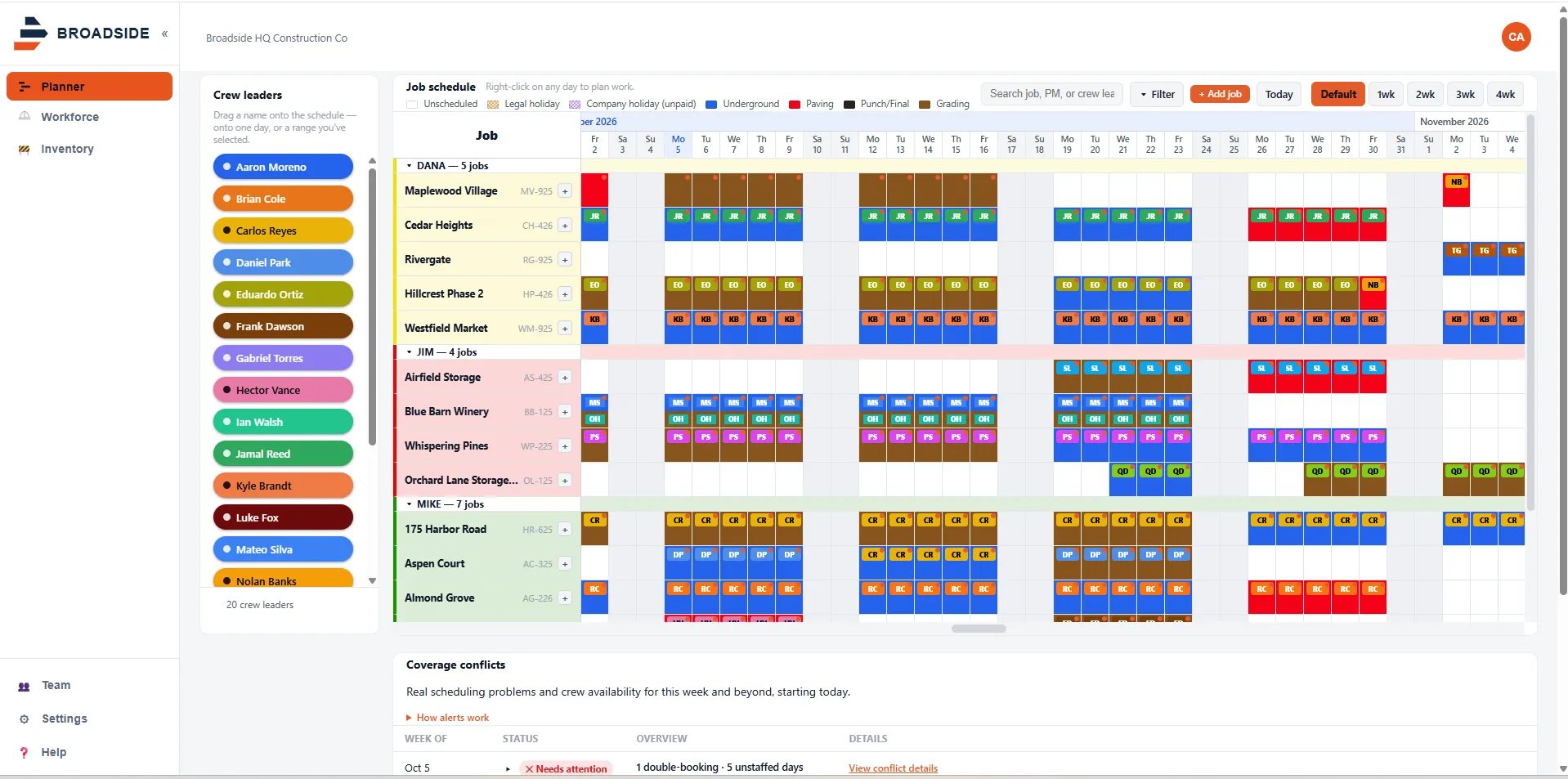
Every job, every crew, one board
See every job and every crew leader on one board. Zoom to 2, 3, or 4 weeks, and scroll as far ahead as you plan. Color work by type, like grading, underground, or paving, or set your own.
Don't get broadsided on Monday
The conflicts panel flags a crew leader booked on two jobs, days with more work than crews, crews with nothing scheduled, and scheduled days with nobody assigned. Fix it before the crew finds out.
A GC push is a drag
Drag a job and the rest of it moves with it. The conflicts panel updates, so you see what the push just broke.
One plan for the whole office
Everyone edits the same board, live. No file locking. No "v4 FINAL" copies. Only people who edit need a seat. PMs, estimators, and foremen can view for free.
- Run two crews on one job the same day
- Filter by PM, crew leader, work type, and dates
- Weekends and holidays skip automatically
- Export all your data any time
Outgrew your Excel crew sheet?
If one person runs the plan and you have a few crews, Excel is fine. Keep it. It's time to move when three or more of these are true:
- More than one person edits the schedule.
- There's more than one copy floating around.
- A crew leader got double-booked in the last month.
- A GC push took more than half an hour to fix.
- You can't see weeks 3 to 6 at all.
Built for subs who run crews across many jobs
Site and horizontal
Grading, paving, underground, utilities, excavation.
Specialty trades
Electrical, mechanical, plumbing, drywall, concrete, and more.
The right size
About 20 to 300 people, running 3 to 30 crews.
Used by the owner, the ops manager, PMs, and estimators. Foremen can view for free.
One or two crews and the owner does the plan? Stay in Excel. Take our free template.
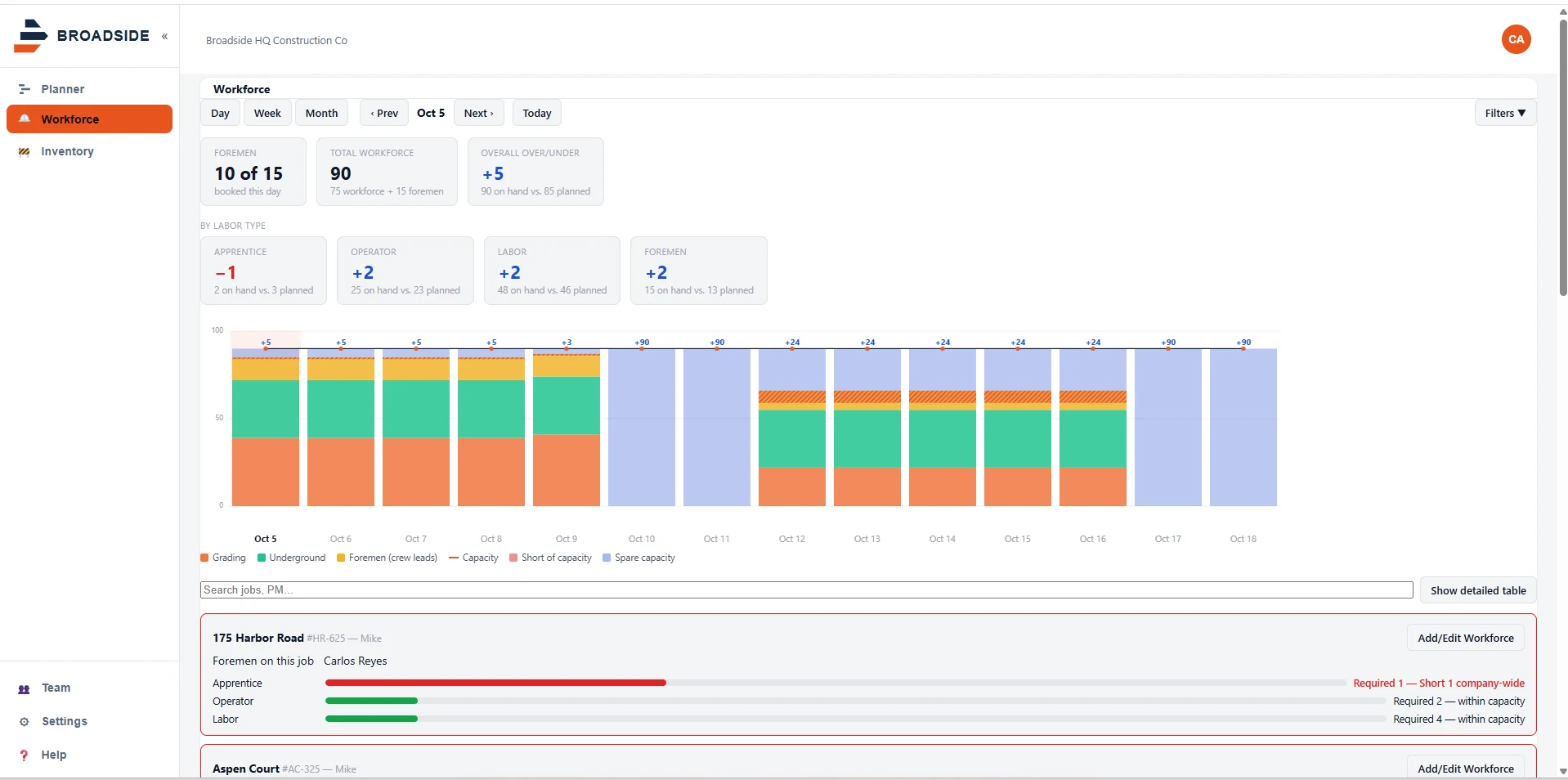
Labor forecast
Set up your own divisions and positions. See how many operators, laborers, or pipe layers each week needs against how many you have. Short or over, weeks ahead.
Keep reading
- Broadside vs Excel: when a spreadsheet is enough and when it stops being enough.
- Broadside vs dispatch software: why a look-ahead board is a different tool.
- Pricing: two seats included, then a flat rate per seat. Viewers are free.
Questions we get
- Is Broadside a dispatch app?
- No. Broadside plans ahead, from next week out to next year: which crew leader is on which job, and whether you have enough crews. Dispatch runs tomorrow: who goes where at 7 AM, trucks, equipment moves, and deliveries. Keep your dispatch tool or your whiteboard for that.
- Does it replace my dispatch software?
- No. It works next to it. Broadside is the plan. Your dispatcher builds tomorrow from it.
- Does it do timecards, GPS, or trucking tickets?
- No, on purpose. Keep the tools you have for those.
- Why not just use Excel?
- If one person runs the plan and jobs don't move much, Excel is fine. Broadside helps when several people edit the plan, jobs move every week, and you need to see conflicts and weeks 3 to 6. See the full comparison.
- Do I have to load the GC's whole schedule?
- No. Enter only your window on each job: when you're in and what you're doing. That's the point.
- Who needs a paid seat?
- Anyone who edits the plan. People who only view it are free, so PMs, estimators, and foremen can see it at no cost.
- How do I get started?
- Start the free trial. Your account opens with a sample company so you can see how it works. Then add your jobs and crew leaders.
- Does it connect to my project management or accounting software?
- Not today. Broadside stands on its own.
Try it with your real jobs.
14 days free. No credit card. If it isn't better than your sheet, keep your sheet.
Start free trialQuestions first? Email sales@broadsidehq.com.